Top 5 AI Image Enhancers for Crisp, Clear Photos
Understanding HD Image Converters
Do your pictures appear blurry or lose quality when you zoom in or print? If so, you might benefit from using an HD image converter. These tools help transform low-quality images into sharp, clear ones, suitable for various purposes such as school, work, employment projects, or sharing with family and friends on social media. They provide professional-quality images with minimal effort.
The best part is that you don’t need to be an expert in photo editing. Just upload your picture, and the powerful AI photo enhancer takes care of everything else. This article will review the top 5 HD image converters available, all of which are user-friendly and offer high-quality results.
What is an HD Image Converter?
Before diving into the list of the top 5 HD image converters, it’s essential to understand what they are. An HD image converter is a tool designed to improve image quality by converting low-resolution images or normal images into higher resolution, sharper, and more detailed versions. In simpler terms, it upgrades your images to make them vibrant, clear, and ready for use in any context.
These converters utilize smart technologies like AI image enhancement and upscaling techniques to restore missing details, reduce blurriness, and give your pictures a realistic look. Instead of struggling to share pixelated or dull images, you can easily upgrade them into high-definition images that look great when shared on screens, printed, or used for social media.
Top 5 HD Image Converters
Artguru HD Image Converter
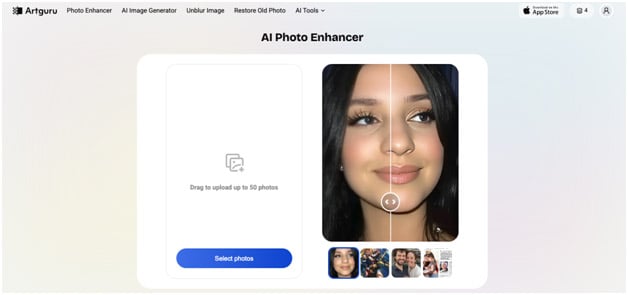
Artguru offers a powerful one-click HD image converter that is completely online and powered by AI. It can enlarge images up to 4 times the original size, reaching up to 4K resolution. For users who want even higher resolution, Artguru’s image upscaler allows enhancement up to 8K while maintaining every detail.
Artguru's AI not only increases resolution but also enhances overall image details. It automatically handles issues like blur, noise, and details. Users can upload up to 50 images at a time for batch processing, making it reliable and fast for bulk conversions.
Artguru supports common formats such as JPEG, PNG, and WebP. The output images are high-quality PNG files that are completely uncompressed, suitable for printing or commercial use. Its interface is simple and user-friendly, accessible via browser on computers and mobile devices. iOS users can download the Artguru Photo Enhancer app from the App Store. It also offers free daily credits for users to try the service without cost.
Let’s Enhance HD Photo Converter
Let’s Enhance is another advanced AI-based platform known for its ability to enlarge images up to 16 times their original resolution. It offers various enhancement modes tailored for different types of images, including general photographs, portraits, and digital images. Users can adjust customizable inputs like lighting fixes with AI and remove backgrounds for a personalized approach.
The platform provides one-click presets for needs such as printing, including posters, photos, and international papers. While it supports batch editing, there are no dedicated mobile apps, and it can only be accessed through a web browser.
New users can redeem free enhancement credits to trial the service. Paid plans allow users to enhance images at higher upscale options (8x and 16x) and offer more advanced features like background removal. Its straightforward interface makes it a good option for anyone looking to significantly improve photo quality, regardless of skill level.
Picsart HD Photo Converter
Picsart, a versatile photo and video editing platform, includes an HD photo converter powered by AI. It converts any image to high definition in a single click, enhancing resolution, clarity, and sharpness to make photos more vibrant and detailed effortlessly.
The tool is free to use, though advanced premium features require a subscription. It supports enhancing old, blurry, or faded images, restoring them with ease. Picsart’s ecosystem also offers additional AI-powered tools like background removal, photo filters, collage making, and AI image generation, providing a comprehensive creative suite.
It is compatible across multiple devices and operating systems, catering to creators, marketers, and small businesses.
Topaz HD Image Enhancer
Topaz Labs’ Image Enhancer is an AI tool that is highly user-friendly and provides high-quality photo enhancement (up to 2x) directly within your browser. It utilizes the latest AI models to increase sharpness, clarity, and resolution without requiring software downloads or complicated photo editing tools.
Unlike other effects and basic denoise tools, it gives you flexibility by allowing you to choose between three different dedicated enhancements: CGI, Standard V2, and Low Resolution V2; each serves different purposes.
The free tier allows up to 10 image exports at resolutions up to 16 MP for non-commercial use. For heavy usage or higher-quality outputs, subscription plans range from Lite to Pro, supporting higher resolutions and commercial applications.
However, more advanced users note that while the tool delivers solid results, it lacks the granular control found in other alternatives.
Upscale.media High-resolution Image Converter
Upscale.media HD Image Converter is an AI-powered online tool designed to upscale and enhance images quickly and simply. It increases resolution up to 10000 x 10000 px, preserving details and reducing artifacts often visible in compressed or blurry photos. You can convert up to 2 images to HD for free each day, and for more, you need to upgrade.
With a clean, beginner-friendly interface, uploading and enhancing images is straightforward, making it accessible to professionals and casual users alike. While focused primarily on image upscaling, it maintains high image quality post-processing, receiving positive feedback for the clarity it brings to photos.
While it does not offer many advanced editing features like cropping or color correction, its specialization in upscaling makes it a valuable tool for those needing fast, reliable HD conversion. It offers a free plan suited for occasional use and paid subscriptions for more extensive commercial applications.
Conclusion
You don’t have to deal with blurry or pixelated photos anymore. With HD image converters, you can quickly turn low-quality pictures into clear and sharp ones. The tools we reviewed—Artguru, Let’s Enhance, Picsart, Topaz, and Upscale.media—are all excellent options for improving your photos. If you want to instantly convert an image into HD with just one click, you can try Artguru HD Photo Converter using its free daily credits.


Comments
Post a Comment